
Partner Profile
Mimecast is a cybersecurity and cloud-based email management enterprise who provide unparalleled email and collaboration protection. Their product suite has become the eyes and ears of over 40,000 global customers, transforming security from reactive to proactive.
Selected Cyber offers Mimecast’s robust Gateway and Gateway-less products, mitigating the risk across a threat landscape driven by malicious cyberattacks, human error and technology fallibility.
Why this partner?
Great M365 Protection
The best layer of protection for M365 – Business-critical supplemental security to M365 and Google Workspace, defending against highly sophisticated attacks and keep work flowing.
Integration with your existing security
The X1 platform provides an extensible architecture that lets users quickly and easily integrate Mimecast with your existing security investments.
Rich feature list
AI-powered detection, DMARC Management, Integrated/complementary solutions, fast and easy bi-lateral threat sharing, insider risk protection, and continuity service.
Learn how we can help you today
Get your free Threat Scan today
Mimecast Cloud Integrated can help you identify malicious emails by running a report of what threats are in the inbox.
With Mimecast Cloud Integrated you can easily see the threats Mimecast has blocked and why and you can remove threats with a click of a button!
We will set up the for a threat scan and generate the report to rubber stamp your environment.
It takes 4 minutes to set up and the report will be ready in 2 working days.
How Does The Threat Scan Work?
The Mimecast Email Security Cloud Integrated Threat Scan processes 30 days of mail already delivered by Microsoft. The mail is processed using the same inspection engines when Mimecast protects live mail, giving you and your organization a window into the types of threats lying dormant in your inboxes. Mimecast will use the Microsoft Graph API within M365 and will not affect mail flow or modify settings in “Threat Scan Only” mode.
What Privileges Are Required?
Mimecast requires M365 Global Admin privileges to allow access to mail and optionally remediate any discovered threats. For more information on the required privileges, review the Connecting to Microsoft 365 article on Mimecaster Central.
What Threat Information Is Provided?
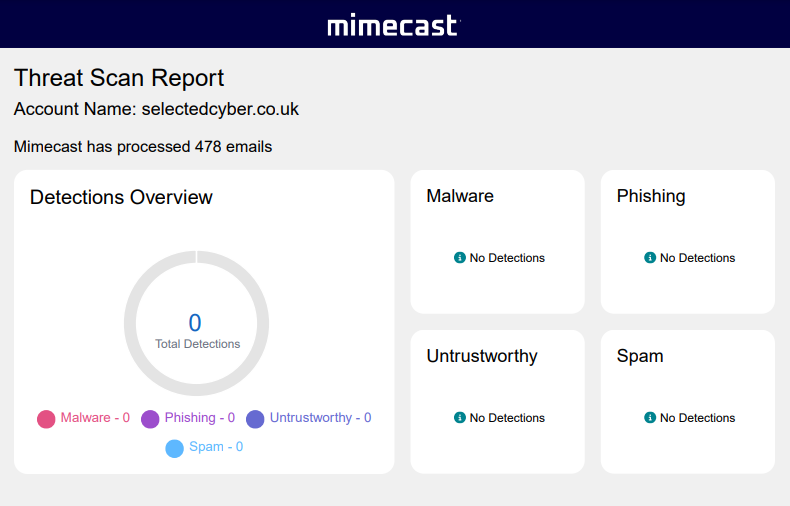
Threats and unwanted mail are shown in 4 categories: Malware, Phishing, Untrustworthy and Spam.
Upon completion of the Threat Scan, a notification email will be sent with a summary report attached. A Mimecast representative can also provide a Loss Avoidance report based on the Threat Scan detections.
Mimecast Features
- Gateway-less – Cloud integrated offers various benefits for organisations with single platform cloud email environments and limited security operations. Users will effortlessly deploy and admin world-class security in four minutes with zero MX changes.
- Gateway – Mimecast’s suite of gateway products is ideal for large and complex, hybrid or on-prem email environments, with multiple email tenants and advanced admin needs. These products are developed to provide Mimecast grade security and data recovery with great configurability and granular policy controls, while also easily integrating with other security tools.
- Email Security
- Internal Email Protect
- Browser Isolation
- Cybergraph
- Mimecast Extensible Security Hooks
- Email Continuity
- Sync and Recover
- DMARC Analzyer (Add-on)
- Brand Exploit Protect (Add-on)
- Cloud Archive (Add-on)
Mimecast Products
Mimecast Email Security
Mimecast Email Security is designed to protect modern businesses against sophisticated and evolving cyber threats. This solution keeps users and data safe by providing protection against spam and viruses, malware and impersonation attempts, and data leaks. Through a single administration console with self-service end user applications, Mimecast makes it easy to manage and protect email.
- Integrated Solution – Reduce cost and complexity with this single, integrated, multitenant, cloud-native solution.
- Open Platform – Integrate Mimecast with your existing security systems through open APIs.
- Ease of Administration – Simplify your deployment and management with a unified, web-based administration console.
- Community Defence – Benefit from Mimecast’s global visibility and rapid detection of sophisticated threats.
- Flexibility and Scalability – Easily scale your business and eliminate your need to manage infrastructure.
- Continuous Innovation – Updates and upgrades are deployed quickly due to solution’s multi-tenant cloud architecture
- Threat Intelligence– Gain a deeper understanding of the cyberthreats relevant to your business.
Mimecast Archive Sync & Recover
Mimecast Sync & Recover for Exchange and Office 365 offers three key capabilities that expand on the built-in tools provided by Mimecast Archiving alone.
- Sync & Recover – Sync & Recover delivers rapid and granular recovery of mailboxes, calendar items and contacts lost through inadvertent or malicious deletion or corruption.
- Granular Retention Management – Granular Retention Management allows administrators to simply manage policy-based retention of email content and metadata. Retention policies can be defined at an Exchange folder or mailbox level.
- Mailbox Storage Management – Mailbox Storage Management enables Administrators to control the size of Exchange and Office 365 mailboxes. If data is in the Mimecast Archive it can be safely removed from the users mailbox while maintaining seamless access via a link to the archive.
Ready to learn more?
Contact us today for a free consultation. We’ll discuss your specific needs and recommend the best service for your organisation. Let’s work together to build a robust security shield and keep your business safe from evolving cyber threats.